
Batch history logging options: Recommended vs Legacy (and what actually lands in BATCHHISTORY)

If you've ever looked at what's taking up space in a busy F&O database, BATCHHISTORY is usually somewhere near the top of the list. Every run of every batch job writes a history row, and by default each of those rows carries the job's Infolog and its packed parameters. On an environment with a lot of recurring jobs ( and most of them have a lot ), that's a steady stream of varbinary(max) writes that hardly anyone ever reads.
Microsoft now gives you a switch for that: Batch history logging options. Easy to overlook, in my view: it's flight-gated for now, the release notes are quiet about it, and you only notice if you're already chasing AxDB storage. Here's what it does, how to turn it on, and what actually changes in AxDB.
Docs first, because they cover the product behaviour:
It's a short article and worth reading in full before you change anything.
What it does
When a batch job runs, the system writes a row to BATCHHISTORY. Two of the columns on that row, INFO and PARAMETERS, hold the Infolog from the run and the job's parameters.
The feature adds a setting that decides whether those two columns get persisted. Learn names the two options like this:
- Recommended (the default once the feature is on).
INFOandPARAMETERSaren't persisted, so they're stored as NULL inBATCHHISTORY. You get the best storage and write performance. - Legacy. Both columns are persisted, the same as it's always been. Pick this when you need the historical Infolog and parameters for troubleshooting or auditing.
The important bit, in Learn's own words: "The current batch job's info log and parameters remain visible in the Batch jobs page. Only the historical records in the batch history table are affected." So Recommended doesn't blind you to what a job is doing now. What you lose is the ability to go back through old history rows and read the Infolog from a run three weeks ago.
How to turn it on
This one is flight-gated. The flight is SkipBatchHistoryInfoAndParametersFlight, and Learn's prerequisite is simple. Contact Microsoft Support to enable it for your environment. It's shown up in the 10.0.45, 10.0.46 and 10.0.47 platform update notes as "Batch history logging options", enabled by Feature flight, so check you're on a build that has it before you raise the request.
If the flight is off, the setting is hidden from the UI and the system keeps persisting INFO and PARAMETERS exactly as it did before. Nothing changes silently.
Once the flight is on:
- Go to System administration > Inquiries > Batch jobs.
- Open a job and find the Batch history section.
- Set Batch history logging option to the value you want.
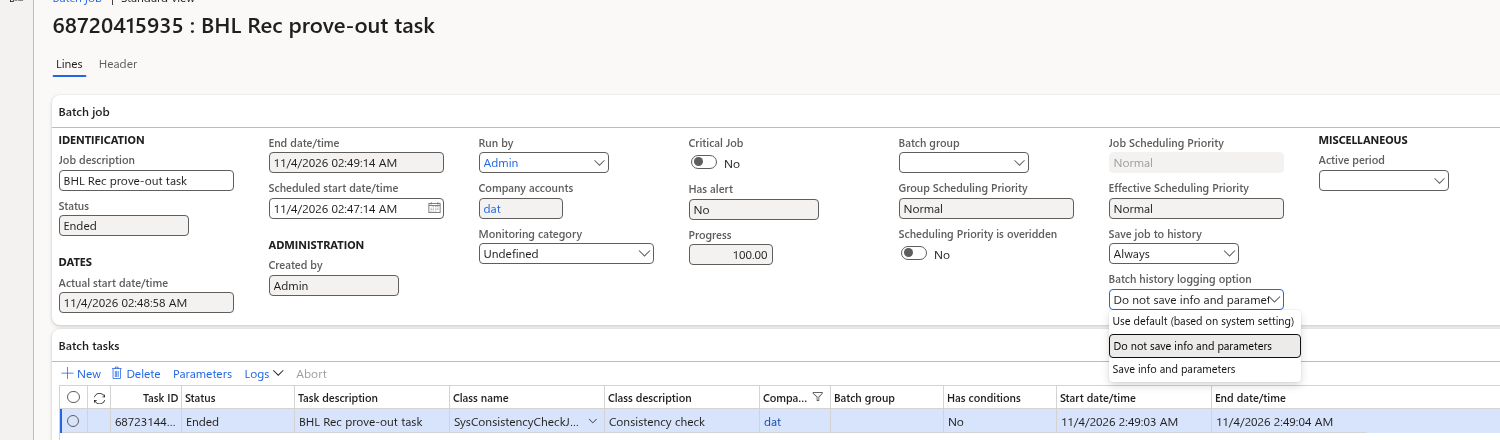
Batch history logging option — Use default, Do not save (Recommended), or Save (Legacy).
A note on naming. Learn talks about Recommended and Legacy. The enum shows different:
| UI | Enum | BATCHHISTORY |
|---|---|---|
| Use default (based on system setting) | 0 |
NULL |
| Do not save info and parameters | 1 |
NULL |
| Save info and parameters | 2 |
Persisted |
What lands in AxDB
I set up two throwaway jobs with the same task (a SysConsistencyCheck run) and gave them different logging options: one on Do not save (Recommended), one on Save (Legacy). Then I ran both and compared what landed in the database.
The setting lives on the job itself (BATCHJOB.HISTORYINFOPARAMOPTION — see the mapping above).
Here's the query I used. Swap in your own caption:
-- After running two jobs with different logging options
SELECT bj.CAPTION, bj.HISTORYINFOPARAMOPTION,
       bh.RECID AS HistoryRecId,
       DATALENGTH(bh.INFO) AS InfoBytes,
       DATALENGTH(bh.PARAMETERS) AS ParametersBytes
FROM dbo.BATCHHISTORY bh
JOIN dbo.BATCHJOB bj ON bj.RECID = bh.BATCHJOBID
WHERE bj.CAPTION LIKE N'%your demo caption%'
ORDER BY bh.CREATEDDATETIME DESC;
Sample result from the two throwaway jobs (history RECIDs masked):
CAPTION               OPT  HistoryRecId    InfoBytes  ParametersBytes
--------------------  ---  --------------  ---------  ---------------
Demo — Do not save      1  687*****2358         NULL             NULL
Demo — Save             2  687*****2372          366             1955
Pretty much what Learn promises:
- Recommended / Do not save:
INFOandPARAMETERSare both NULL. Nothing there to read from history. - Legacy / Save: both columns are populated.
INFOholds the Infolog from the run;PARAMETERSholds the packed job parameters and is usually the bigger of the two.
If you actually need to read that history, use the Batch jobs UI (or unpack it in X++). Don't build reporting on top of the raw varbinary columns.
Flipping to Recommended doesn't clear what's already in BATCHHISTORY. Older rows keep whatever INFO / PARAMETERS they had. New runs go NULL (unless the job is Legacy); the leftovers stay until your usual batch history cleanup removes them.
How this relates to occurrence telemetry
In my last post on batch job occurrence telemetry I mentioned this feature in passing. Here's how the two fit together.
Occurrence telemetry (BatchJobStart / BatchJobFinished in Application Insights) is a completely separate path. It carries the job caption, status, duration, the batch job history ID and a CorrelationId that pairs start and finish. It does not carry the Infolog or the parameters. Turning Recommended on doesn't take anything away from it, and turning occurrence telemetry on doesn't give you back what Recommended drops.
The way I think about it:
- If the question is operational ( "did it finish, and how long did it take?" ), use occurrence telemetry. That's what it's for, and it's where your alerting should live.
- If you need the historical Infolog or parameters sitting in the database for audit or troubleshooting, set Legacy (Save info and parameters) on the jobs that matter. Leave everything else on Recommended.
You don't have to pick one setting for the whole environment, and you shouldn't. Most recurring housekeeping jobs don't need their parameters kept for every run forever.
Best practices
Straight from Learn, with my two cents:
- Prefer Recommended to reduce storage and improve batch write performance, especially when jobs run frequently. It's the default for a reason.
- Use Legacy where you need history for regulatory, audit or troubleshooting reasons. Be deliberate about it, job by job.
- Combine it with regular batch history cleanup. Recommended makes each row smaller, but it doesn't stop rows piling up. You still need a sensible retention policy.
If you've measured the storage difference after flipping busy jobs to Recommended, or found a case where Legacy was still worth keeping, just let me know.


